Free Sheet Cutting Optimizer for Panels, Plywood & Sheet Metal
CutWize's sheet cutting optimizer helps you minimize waste and maximize efficiency when working with 2D panel materials. Perfect for cabinet makers, sign makers, and metal fabricators looking for powerful 2D nesting and panel layout software. Whether you need a sheet cutting calculator for quick estimates or a full panel cutting optimizer for complex multi-sheet jobs, CutWize delivers instant results.
No signup required. Enter your sheet stock and cuts below — the optimizer updates automatically.
Try the Sheet Cutting Calculator
Enter your sheet dimensions and required panels below to see an optimized cutting plan instantly.
Empty areas 300mm or larger on both sides are reusable offcuts, anything smaller is waste.
Your cutting plan is ready — save it with a free account
You've already done the hard part. Create a free CutWize account to keep your jobs, return to them later and continue optimising. No credit card required.
What is Sheet Cutting Optimization?
A sheet cutting optimizer is specialized 2D nesting software designed to arrange rectangular cuts on flat panel materials in the most efficient way possible. Also known as panel cutting software or sheet nesting software, it eliminates the guesswork and trial-and-error of manual layout planning. Our material nesting guide covers the fundamentals in depth.
Whether you're looking to optimise your plywood sheets for custom cabinetry, cut MDF and melamine efficiently, or nesting sheet metal for fabrication, manual calculation often leads to significant scrap. Knowing the best way to cut plywood is essential. Our optimizer uses advanced algorithms to find the optimal cutting pattern, taking into account the blade kerf, grain direction, and required offcut sizes.
By using our cutting optimiser alongside our full cut list optimizer and cut list calculator, businesses can plan material usage more systematically and reduce avoidable waste. CutWize shows the resulting material use, waste, and reusable offcuts for each job. Check out our features page to learn more about our 2D nesting capabilities.
How CutWize Handles Sheet Optimization
Our sheet optimization process is designed to be intuitive while offering powerful controls for professional workshops:
- Enter Sheet Stock: Input your available panel sizes (e.g., 4x8 ft plywood, 1200x2400mm MDF). You can mix different sheet sizes in the same job.
- Add Required Panels: Enter the dimensions and quantities of the pieces you need to cut. Add labels or job names for easy sorting later.
- Set Constraints: Define your blade kerf (thickness of the cut), grain direction requirements if needed, and your preferences for offcut tracking.
- Live Optimization: There's no button to press — CutWize re-optimizes your layout on the fly every time you add or change a cut, running thousands of combinations instantly to minimize waste and maximize usable offcuts. See more on planning sheet cuts.
- Export & Cut: Generate clean, easy-to-read PDF layouts that your operators can follow directly at the panel saw or CNC machine.
For more details on setting up your workflow, read our How It Works guide.
Industries That Benefit From Sheet Optimization
- Cabinet Makers & Woodworkers: Optimize MDF, particleboard, and plywood sheets for kitchen cabinets and custom furniture, and plan your cabinet projects. You can also nest plywood panels effectively.
- Metal Fabricators: Reduce scrap on expensive sheet metal, aluminum plates, and steel panels before shearing or plasma cutting with these metal shop tips and CNC sheet patterns.
- Sign Makers: Get the most out of acrylic, polycarbonate, and foam PVC sheets for architectural signage and displays.
- Glass Shops: Minimize breakage and waste when scoring and snapping large glass lites into custom window panes or mirrors.
- Plastics Manufacturers: Efficiently yield parts from UHMW, HDPE, and other engineering plastic sheets.
Sheet Cutting Example with Real Measurements
If you've ever wondered how many pieces from an 8×4 sheet you can get, our software provides the answer instantly. Consider this common example using a standard 2440 × 1220mm (8x4 ft) sheet. This is especially useful for small workshop layouts:
- Sheet Size: 2440 × 1220mm
- Pieces Needed: 800×600mm (×2), 600×400mm (×1), 400×300mm (×2)
CutWize automatically arranges these pieces to minimize waste, making sure you optimize sheet cuts and retain the largest possible reusable offcut for future projects.
Manual Layout vs. CutWize Sheet Optimizer
Planning cuts manually on a whiteboard or graph paper is a common practice, but it's fundamentally flawed for complex jobs. Humans naturally try to align edges, which rarely results in the true mathematical optimum.
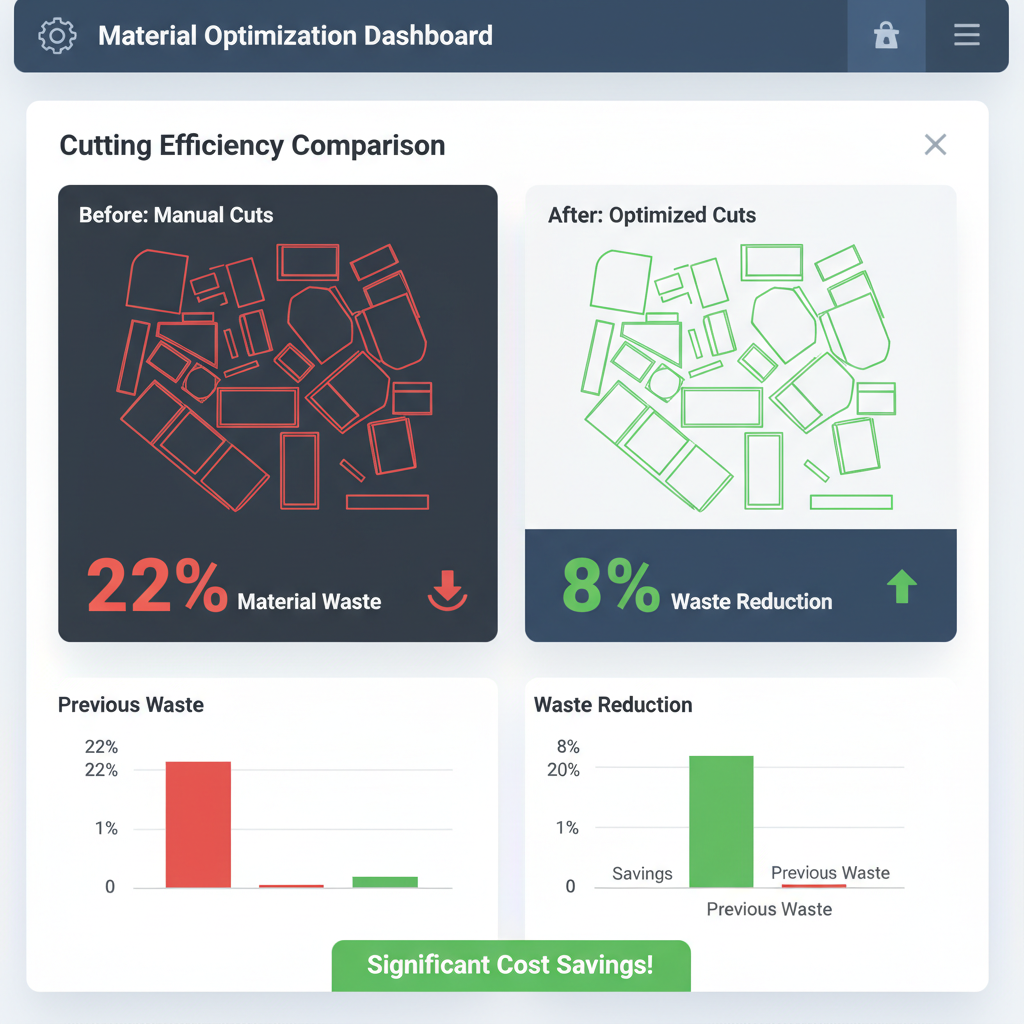
With CutWize, you gain access to intelligent 2D cutting optimization that considers every possible rotation and placement. It automatically accounts for the blade thickness on every cut, ensuring your final pieces are exactly the right size. Furthermore, it tracks your reusable offcuts, adding them back into your inventory for the next job. Learn more about how this impacts your bottom line on our pricing page.
Sheet Cutting Calculator & Sheet Optimizer Features
Whether you need a quick estimate or a comprehensive cutting plan, CutWize adapts to your workflow. As a sheet cutting calculator, it allows you to instantly punch in a few part dimensions while standing in the lumber aisle to determine exactly how many sheets of plywood or MDF you need to buy.
When you are back in the workshop, CutWize serves as a fully-featured sheet optimizer. It generates detailed, printable 2D nesting diagrams for the saw operator, tracks your usable offcuts automatically, and supports complex multi-material jobs across your entire production run.
Frequently Asked Questions
Start Optimizing Your Sheets Today
Stop wasting valuable panel material. Generate your first optimized cutting layout in seconds.
Also optimize: Roll Cutting | Linear Cutting | Plywood | MDF & Melamine
Cut Lists: Cut List Optimizer | Cut List Calculator | How to Create a Cut List | Reduce Material Waste
Resources: Material Waste Calculator | Cabinet Tutorials | Case Studies | FAQ
Guides: Reduce Sheet Material Waste | How to Reduce Sheet Waste | Cabinet Panel Layouts | Efficient Panel Cutting Tips | How to Arrange Parts on Sheets
Strategies: Reduce Plywood Waste | Reduce MDF Waste | Best Way to Cut Plywood | Optimize for Cabinets | Minimize Offcuts
More Resources: Small Workshop Layouts | CNC Sheet Patterns | Sheet Waste Business Costs | Woodworking Waste Calculator | Planning Sheet Cuts | Nest Plywood Panels | Furniture Layouts | Metal Shop Tips | Material Nesting Guide